Clone a Jira work item with its sub-tasks, or use a template? What Clone really copies
Jira's Clone can now copy an epic with its children and sub-tasks, which is often all a team needs. We cloned one on a Jira Cloud site and read what came back: what it copied, what it changed, and where a cloned template starts to drift.
Short answer
- Clone is enough when one person repeats a structure now and then in one space, and does not mind tidying up afterwards.
- Expect to tidy up. Every copied work item gets "CLONE - " in front of its summary, and anything specific to the original stays in the text, such as its key.
- A template is better when several people or spaces use the same structure, when the source must not be edited by accident, or when the text should fill itself in.
What we cloned, and what came back
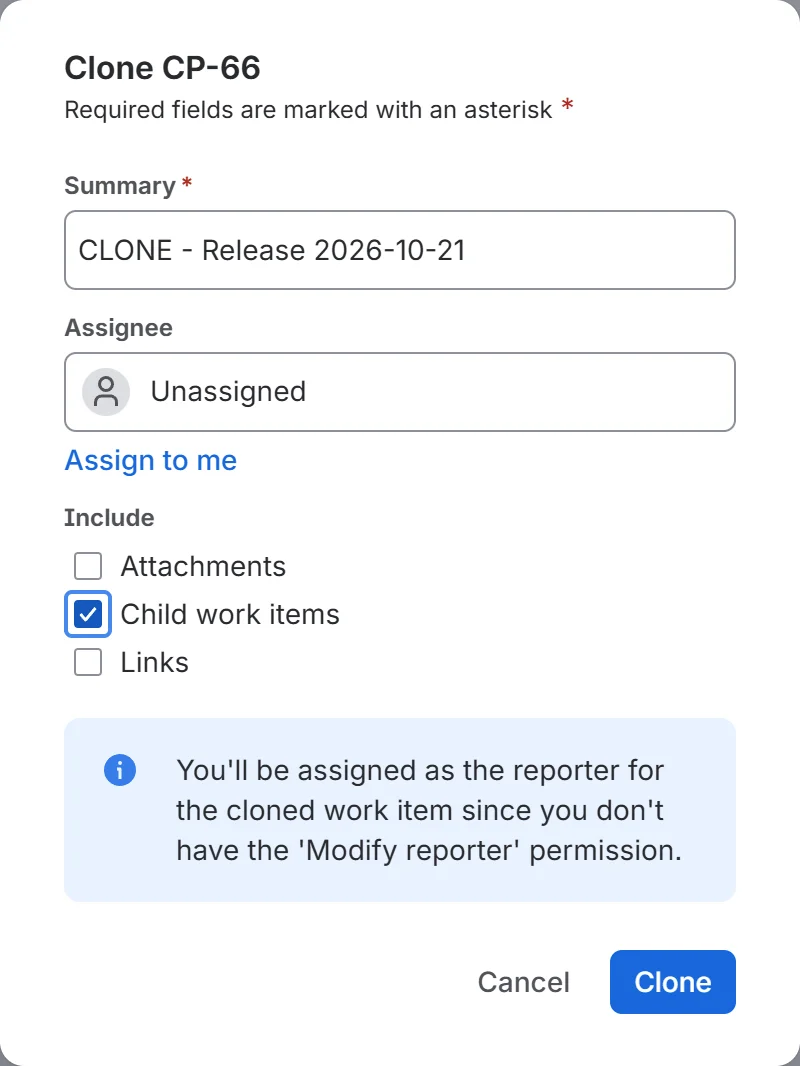
We took an epic with four child work items, a story and three tasks, two of which had two sub-tasks each, so eight work items under one epic. We opened it, chose ••• → Clone, ticked Child work items and pressed Clone.
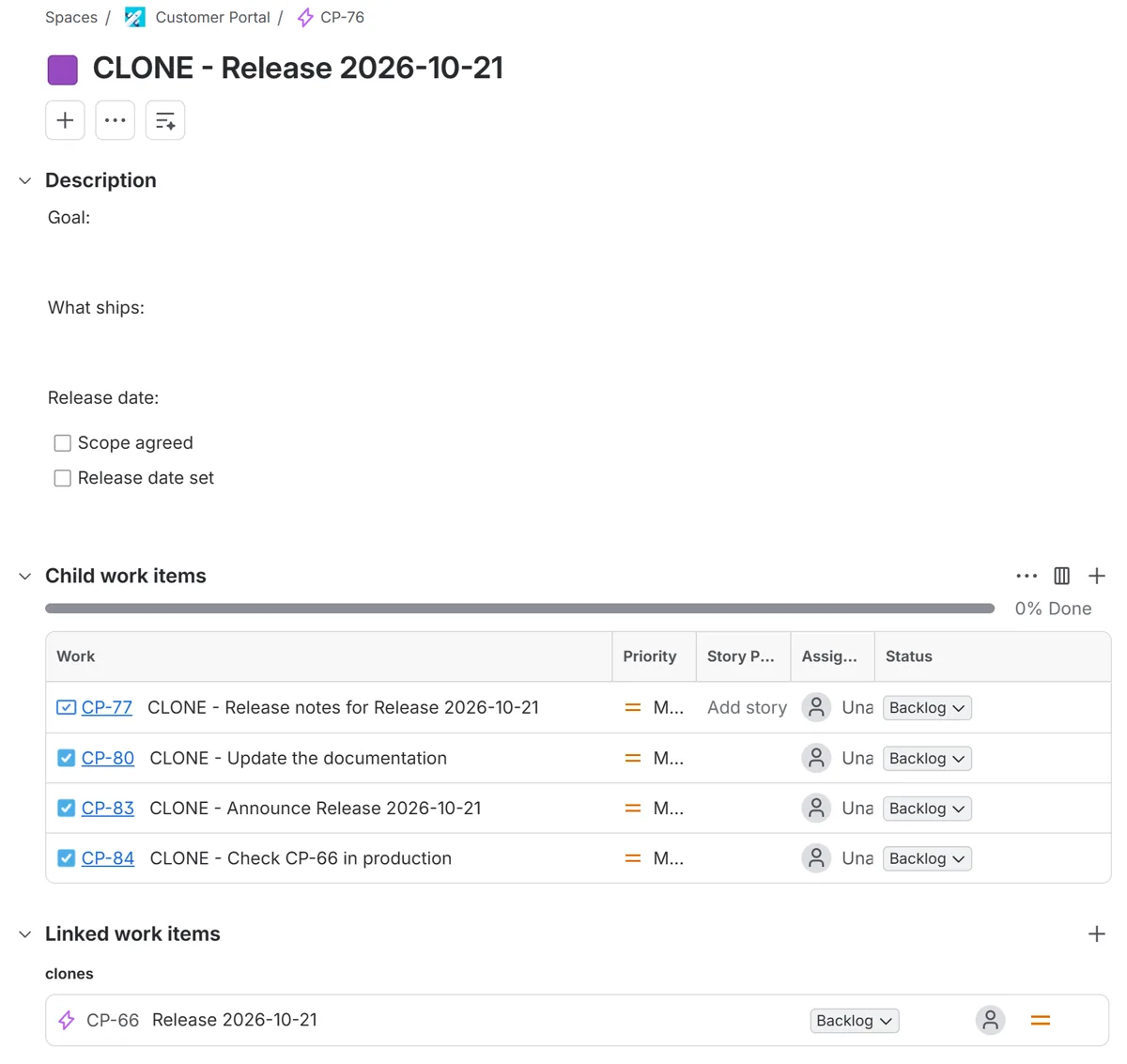
What came back, in under half a minute:
- A new epic, and all eight work items under it, in the same order, with the sub-tasks under the right parents.
- "CLONE - " in front of every summary, the children's and the sub-tasks' too.
- The epic's description, its checklist and its label.
- A clones link from the new epic to the original.
- The text of the original, unchanged. One task was called "Check CP-66 in production", and it came back as "CLONE - Check CP-66 in production", naming the old epic.
One test on one epic, with nothing assigned and no dates set. We did not test how Clone treats due dates, sprints, assignees on the children, or work items that were already done, so check those on your own site before relying on them.
What Clone copies
Atlassian's page says a clone copies "most information" from a work item, such as the summary and description. These are copied only if you choose them in the dialog: attachments, sub-tasks, links, comments, custom fields that are set up to be cloned, and child work items for an epic. You need the Create work items permission in the space.
A clone is a separate work item. Changing the original later does not change the clone, and the other way round.
Where cloning drifts
Clone copies a shape. It does not know it is a template, and that shows up in four ways over time:
- The prefix. Eight work items means eight summaries to edit. The dialog changes only the top one. Atlassian says a space admin can remove the prefix in bulk with Automation, which is a rule to set up and keep.
- Stale text. Anything specific to the source travels with it: its key, a version number, last quarter's date. Nothing fills in or flags those.
- The source is a live work item. Anyone with permission can edit, move or close it, and the next clone carries that change without anyone noticing.
- No one is told when it stops fitting. If a work type is renamed or a field becomes required, you find out when someone next clones it.
If you keep a source to clone
Keeping one work item only for cloning is a reasonable setup. Three things we learned from the test:
- Keep it in the space where it will be used. The dialog offers no choice of space, so a clone lands beside the original. A separate "templates" space would mean moving every clone afterwards.
-
Do not mark it with a label. Labels are copied:
our epic's label came across. A
templatelabel on the source ends up on every clone. -
Hide it by key instead. A key is not copied, so
a board filter can leave out the source and keep its clones. For
an epic source CP-66 with children, add this before any
ORDER BY:AND key not in (CP-66) AND (parent is EMPTY OR parent not in (CP-66)). Keep theparent is EMPTYpart: on our test spaceparent not in (CP-66)alone also dropped every work item that has no parent, 21 of 84. If the board shows sub-tasks, add the source's children to the second list too.
Write the source's text so it holds up when copied: no keys, no dates, nothing that belongs to one release.
Clone, rule or template
Which to use, from the test above and the guides linked below.
| If this is true | Clone | Automation rule | Template app |
|---|---|---|---|
| One person, one space, now and then | Best fit | More setup than it saves | More than you need |
| Summaries should carry the epic's name | No, edited by hand | Yes, with a smart value | Yes, with a placeholder |
| The source must not change by accident | No, it is a live work item | Yes, the rule is the source | Yes, the template is separate |
| Several structures to pick from | One source for each | One rule for each | Yes, a list to pick from |
| Several spaces use the same structure | A source in each space | A global rule | Yes, one template |
| You must see it before it is created | Top work item only | No | Depends on the app |
| Cost | None | None; rule runs count on some plans | A paid app above a free tier |
For a rule, Atlassian has a knowledge base article on cloning a work item with its sub-tasks in Automation, and our epic template guide builds a structure from a rule step by step, with what each run costs.
What our app does, and does not
We make Issue Templates & Create Defaults for Jira, so we have a stake in this choice. If Clone does your job, use it. This describes version 2.14.0.
Where it answers the drift above:
- No prefix to remove. Summaries are written once, and placeholders such as
{{parent.summary}},{{parent.key}}and{{today}}are filled in, so "Check {{parent.key}} in production" names the new epic. - A template is not a work item. Nobody closes it on a board, and each saved change is kept, with the last 50 versions restorable.
- A list to pick from. People choose on the space's Templates page, and Jira's own Create dialog opens filled in before anything is created. You can also start from a work item with Save as template.
- A daily check. It tests each template against its spaces and lists what stopped working.
Where it stops:
- Someone has to start it; it does not fill the Create dialog by itself.
- It does not copy attachments, comments or links, which Clone can.
- Two levels under the top work item, and up to 100 work items in a template.
Prices and a free trial are on its Atlassian Marketplace listing; a site with up to ten users pays nothing for it.
Questions
Does Jira Clone copy sub-tasks?
Only if you ask. In the Clone dialog, tick Subtasks under Include for a task or story, or Child work items for an epic. Without that, Clone copies the one work item.
Can I clone an epic with its stories and sub-tasks?
Yes. On an epic the dialog offers Child work items. In our test on an epic with four children and four sub-tasks, all eight were copied in the same order, under a new epic, in under half a minute.
Can I remove the CLONE prefix?
On the top work item you can edit the summary in the dialog. The children get the prefix too, and the dialog does not offer a way to change theirs. Atlassian says a space admin can remove it in bulk with Automation.
Can I clone into another space?
Not from the dialog we used: it asks for a summary, an assignee and what to include, with no choice of space. The clone lands in the same space as the original.
Is a clone linked to the original?
Yes. The new work item gets a "clones" link to the original, and Atlassian says you can unlink it at any time. The clone is a separate work item, so later changes to the original do not reach it.
What does the Issue Templates app cost?
Prices and a free trial are on its Atlassian Marketplace listing; a site with up to ten users pays nothing for it. We do not repeat the other prices here, so they cannot go out of date on this page.
Related pages
- Jira issue templates in Jira Cloud: everything Jira does on its own, and where each option stops.
- Jira templates with sub-tasks: the same sub-tasks on every work item of a kind.
- Jira epic template with stories and sub-tasks: an Automation rule that builds the breakdown.
- Add the same sub-tasks to an existing Jira work item: when the work item already exists.
- Jira issue template apps compared: twelve apps in two tables, and what to test in a trial.
Sources and changes
The test was one clone of one epic on a Jira Cloud development site on 4 November 2026, read back through Jira's REST API. Statements about what Clone copies in general come from Atlassian's pages below.
- Clone a work item (checked 4 Nov 2026)
- Automation: How to clone tasks/stories along with their sub-tasks (KB) (checked 21 Oct 2026)
Changelog
- . First version, describing Jira Cloud on that date and Issue Templates & Create Defaults for Jira 2.14.0.
Corrections
None yet. If something here is wrong, email [email protected].