PlantUML in Confluence Cloud, drawn in the page, with no PlantUML server
Version 2.10.0 adds a second macro, PlantUML Diagram, to the diagrams app. PlantUML is drawn inside the Confluence page, and the diagram’s text goes nowhere else.
In short
- A new macro, PlantUML Diagram: type
/plantumlin the Confluence editor. - Drawn in the reader’s browser, with no PlantUML server. Nothing is sent outside Atlassian.
- Same app, same license: Mermaid and PlantUML together.
- Mermaid diagrams now show their saved picture first, then the live drawing.
What is new
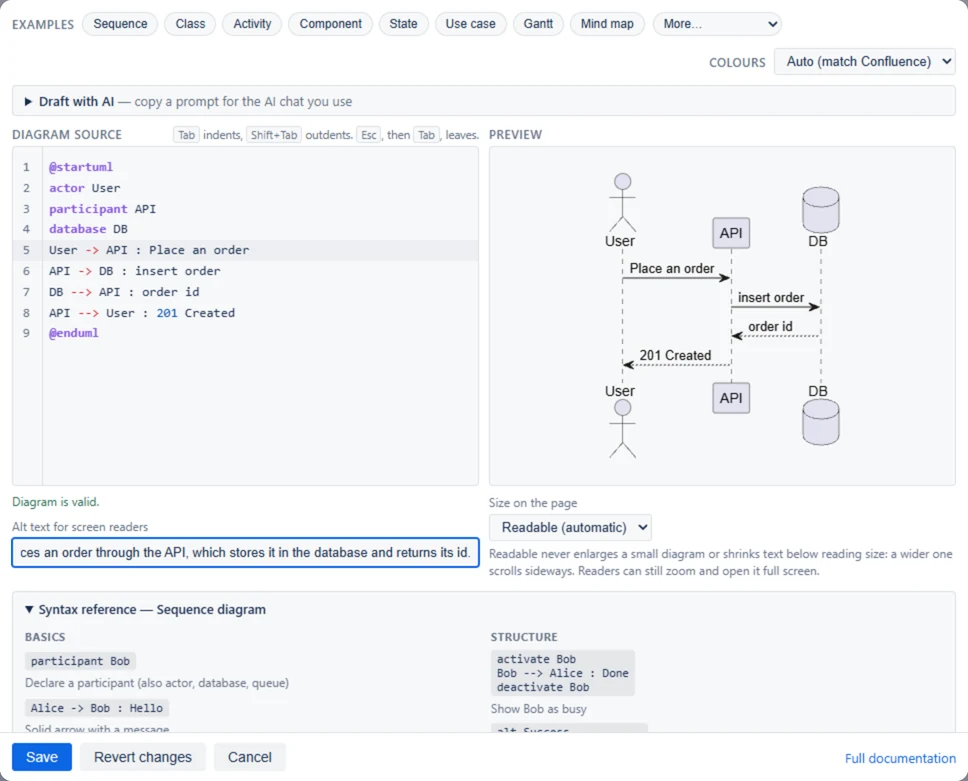
Type /plantuml in the Confluence editor to add a PlantUML Diagram macro. It opens the same editor as the Mermaid macro: the source on the left, the drawing on the right, and examples to start from.
- 22 examples: sequence, class, activity, component, state, use case, Gantt, mind map, C4 and more.
- 43 themes, emoji, and the C4, ArchiMate and Kubernetes libraries.
- Word and PDF exports show each diagram as a picture.
- Draft with AI and Fix with AI copy a prompt for your own AI chat. Nothing is sent.
Drawn inside the page
There is no PlantUML server. PlantUML is drawn in the reader’s browser, inside the Confluence page, so the diagram’s text is sent nowhere and nothing is fetched from the web. The app runs on Atlassian Forge and declares no outside addresses, so nothing leaves Atlassian.
Mermaid pages show a picture first
Also in this version: Mermaid diagrams show their saved picture first, then the live drawing.
What is not drawn
Graphviz (@startdot), ditaa, formulas, the AWS, Azure and icon libraries, and includes from web addresses are not drawn. The editor says so when a diagram uses one.
One app, one license
Both macros, Mermaid Diagram and PlantUML Diagram, are in the same app with the same license.
Read more
- PlantUML documentation
- PlantUML reference
- Learn PlantUML: a beginner’s guide
- What’s new, version by version
Source: the release notes for each version on the Mermaid & PlantUML Diagrams for Confluence listing on the Atlassian Marketplace.