Mermaid & PlantUML for Confluence
Diagrams that live with the page. Write Mermaid or PlantUML as text and the diagram draws as you type. It is saved with the page, goes into PDF and Word exports, and nothing leaves Atlassian.
Get startedAdd your first diagram in five minutes
MermaidHow the text works, recipes and the reference
PlantUMLThe second macro, in the same app
OpenAPIA map of an API, from its description
What do you want to do?
Draw something
Work with a diagram
- Change the colors, or use dark modeThe Colours list sets the colors for the whole diagram
- Export the page to PDF or WordFrom More actions at the top of the page, then Export
- Fix an errorWhen the editor can’t read the text, a message appears under it
- Paste from GitHub or another appPaste the whole thing; the editor tidies it up
flowchart LR
  A[Write draft] --> B[Review]
  B --> C[Publish]
@startuml
actor Customer
participant "Web shop" as Shop
database Stock
Customer -> Shop : Place order
Shop -> Stock : Is it in stock?
Stock --> Shop : Yes, 3 left
Shop --> Customer : Order confirmed
@enduml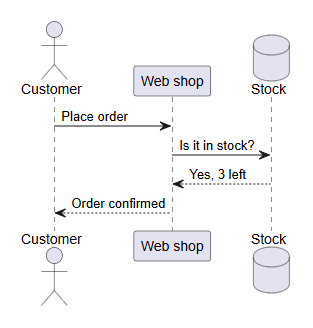
Next steps
- New here? Get started in 5 minutes.
- Know what you want to draw? Go to the diagram recipes.
- Already write Mermaid? The reference has the full syntax and every limit.
- Writing PlantUML? See the PlantUML documentation and Learn PlantUML.
- Used the app before version 2.9? Read what's new.
Like the app? Rate it on the Marketplace. A rating, good or bad, helps other Confluence teams decide.