How to add Mermaid diagrams to a Confluence Cloud page
With Mermaid, you write a diagram as a few lines of plain text instead of dragging boxes around. Confluence Cloud doesn't draw it on its own, but getting one onto a page takes only a few extra minutes. This guide covers three ways, depending on what you need.
Short answer
-
Confluence Cloud does not draw Mermaid by itself.
GitHub and GitLab draw it in Markdown files, and AI chat assistants
often answer in it when you ask for a diagram. Paste a
```mermaidblock into a Confluence page, though, and you get a code block, not a picture. - One diagram that won't change: make a picture in Mermaid's own Live Editor and attach it. No app needed.
- Live on the page, and free: the viewer macro that Atlassian Labs publishes draws a diagram from a code block on the page.
- An editor with a live preview: a Mermaid macro app. We make one, so the third way below shows ours.
A Mermaid diagram in five lines
flowchart TD
  A[Change requested] --> B{Needs approval?}
  B -->|Yes| C[Lead approves]
  B -->|No| D[Ready to build]
  C --> D
The first line names the kind of diagram: flowchart,
sequenceDiagram, erDiagram,
gantt and others. The rest describes the boxes and the
arrows between them.
Mermaid's own site has the full syntax for every kind, and it is worth bookmarking whichever way you choose below. For a plain-English start, see How Mermaid text works in our guide.
Three ways to get it onto the page
1. A static picture
Paste the text into Mermaid's own Live Editor, download the diagram as a PNG or SVG, and attach the image to your Confluence page like any other file. It needs no app and no account, and the picture looks the same in every export and every theme.
The catch: it is a picture now, not Mermaid text. Change one box and you redraw and upload it again. So that the next person can edit it, put the Mermaid text in an Expand element under the image.
Good for: a one-off diagram that won't change, or trying out Mermaid before you install anything.
2. A free viewer macro
If you want the diagram to stay live on the page, there is a free option. Atlassian Labs publishes Mermaid diagrams viewer on the Atlassian Marketplace, at no charge on 10 November 2026. It draws a diagram from a Mermaid code block on the same page. Following its own instructions:
- A site admin installs the viewer from the Marketplace.
- Add a code block to the page and write your Mermaid text in it.
-
Type
/, search formermaidand add the viewer's macro. It draws the diagram from the code block.
Because the text stays in an ordinary code block, it is still readable if the app ever breaks or is removed, which its listing gives as a reason to work this way. That is a real advantage for long-lived documentation. You write the Mermaid in that code block yourself, so if a live preview or help with the syntax matters to you, check what the viewer's listing offers.
Good for: teams who are comfortable writing Mermaid by hand and want it live and free.
3. A Mermaid macro app
Several Marketplace apps add a Mermaid macro to Confluence. Ours, Mermaid Diagrams & Gantt for Confluence, has an editor with the Mermaid text on one side and a live preview on the other. This is how it works in version 2.9.0:
-
Edit the page, type
/mermaidon an empty line and select Mermaid Diagram. The editor opens by itself.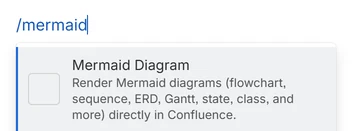
Mermaid Diagram is the first item in the list. -
Start from an example, or paste your own Mermaid text into
Diagram source. Eight examples are buttons
(Flowchart, Sequence, ERD, Gantt, Class, State, Pie and Mind
map), and More… beside them lists 24 other
kinds of diagram.
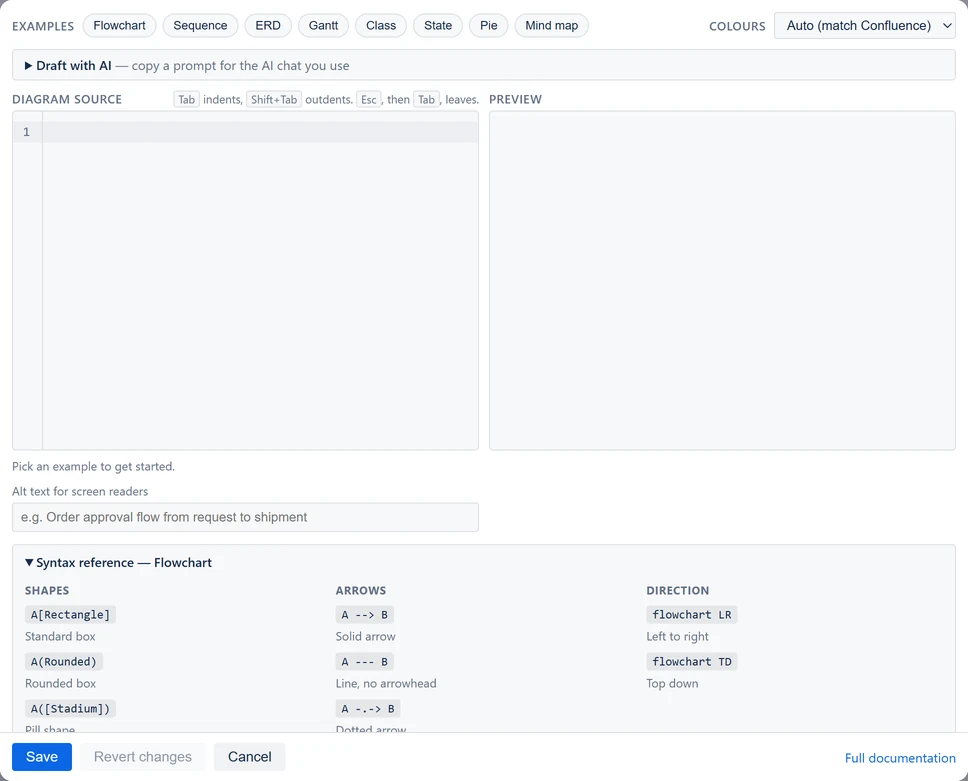
A new diagram, as the editor looked in version 2.6. The examples are along the top, and the Syntax reference is open underneath. Since 2.8, Size on the page sits under the preview. Since 2.9, More… sits beside the examples, and Look and Layout beside Colours. - If the editor can't read the text, a message under it usually names the line, and Save stays off until it is fixed.
- Under Colours, leave Auto (match Confluence), which follows Confluence's light or dark mode, or choose a fixed scheme. Add alt text for screen readers, select Save, then Update to publish the page.
On the published page, the diagram shows at a size people can read: a small one is not blown up to the page width, and a wide one keeps its text readable and scrolls sideways. Readers hover over it for a toolbar with zoom, Fit and full screen, and a double-click opens it full screen too. To size one diagram differently, use Size on the page under the editor's preview.
Every step, with pictures, is in Get started in 5 minutes.
Good for: anyone who wants a live preview while writing and examples to start from. Before you settle on any app, check how its diagrams look once they leave the page.
Test four things before a whole team uses it
Whichever app you pick for the third way, or if you are choosing between several, try these on one test page first. These are the places where a diagram leaves the editor, and it is cheaper to find a problem on one page than after a team has written fifty diagrams.
- Export the page to PDF. Does the diagram print cleanly, without a toolbar in the picture?
- Export the page to Word. Does the diagram come out as a picture, or as a block of Mermaid text?
- Switch your Confluence theme to dark and look at the diagram again. Does it stay readable?
- Paste in a diagram from somewhere else: a GitHub README, an AI chat's answer, or another Mermaid app if you are switching. Does the wrapping (the fence, the chat's other text, the old app's saved format) come off, or do you tidy it by hand?
How our app handles each of these is on the comparison page.
Where it goes wrong the first time
Problems that come up often enough to mention in advance. What our app does is as of version 2.9.0.
| What you see | Why | What to do |
|---|---|---|
A diagram pasted from GitHub or an AI chat shows an error, or the ``` lines are still in the text |
The Mermaid is still inside its wrapping, which Mermaid itself can't read | Remove the fence lines and any chat text before pasting, or use an editor that does it for you. Ours removes them as you paste when the text holds one mermaid block or is wrapped in one plain ``` fence, and Ctrl+Z (Cmd+Z on a Mac) gives back exactly what you pasted. |
| A Word export shows Mermaid text instead of a picture | The export needs a picture of the diagram. In our app, the picture is saved with the diagram when you select Save, so diagrams saved before version 2.4, or saved before 2.6 with their own theme or colours in the text, don't have one yet | In our app, open the diagram and select Save once. A diagram too large, or taller than about 22 inches, still reaches Word as text, so split it into smaller ones. |
| A diagram is hard to read in dark mode: dark lines on a dark background, or the reverse | The diagram's colours don't match the page's theme | Choose a colour setting that follows Confluence's theme rather than a fixed one. In ours, that is Auto, the default, and a diagram that doesn't match the page sits on its own panel. |
| A small diagram fills the whole page width, or a wide one is too small to read | The diagram is stretched or shrunk to the width of the page. Our app did this before version 2.8 | In ours, from 2.8, a diagram is never drawn larger than Mermaid draws it, and a wide one keeps its text readable and scrolls sideways. Select Fit to see all of it, or double-click it for full screen. Size on the page, in the editor, has Fill the width for the old behaviour. |
| A PDF of a page with many diagrams is slow or fails | Diagrams drawn live for the export take time, and in our app a page with about 100 or more diagrams can hit a limit on Atlassian's platform (CONFCLOUD-82734, still open on 10 November 2026) | In our app, open and save older diagrams so the export uses their saved picture. Split very large pages. |
More on exports in Export the page to PDF or Word.
Questions
Does Confluence support Mermaid natively?
No. On 10 November 2026, Confluence Cloud had no built-in Mermaid rendering: a pasted ```mermaid block stays a code block. A static picture, the free viewer macro or a Mermaid macro app gets a diagram onto the page.
Can I use Mermaid in Confluence for free?
Yes, with a static picture or the free viewer macro. Our app is free for a site with up to 10 users. Above that it costs $0.35 per user per month for every user, and less per user above 100 users, on 10 November 2026. The Marketplace listing has the current price.
Can an AI chat write Mermaid for me?
Yes. AI chat assistants often answer a diagram request in Mermaid. Copy the whole answer and paste it into the editor; ours keeps just the diagram when the answer holds one mermaid block. Ours also has Draft with AI: describe the diagram, and it copies a ready-made prompt for the AI chat you already use. The app itself never contacts an AI.
What kinds of diagram does Mermaid support?
Flowcharts, sequence diagrams, entity relationship diagrams, Gantt charts, class diagrams, state diagrams, pie charts, mind maps, user journeys, timelines, quadrant charts, git graphs and more. Mermaid's own site, mermaid.js.org, has the full syntax for each.
What happens to our diagrams if we stop paying for the app?
It depends on the app, so ask before you rely on one. In ours, from version 2.8, the diagrams keep showing on their pages as they were last saved, and exports keep their pictures. Only editing stops until the licence is active again. A static picture and the free viewer macro need no licence.
I'm moving from another Mermaid app. Do I have to retype everything?
No. Copy each diagram from the old app and paste it into the new one. In ours, the editor takes the diagram out of the wrapping another Mermaid app saves around it.
Related pages
- Mermaid diagrams in Confluence Cloud: how the options compare: the four options side by side, where our app fits and where it stops.
- Gantt charts in Confluence Cloud, with Mermaid: the Gantt syntax, and where a plan written as text breaks down.
- Moving a diagram from another Mermaid app: copy and paste, and what the editor cleans up.
- Diagram recipes: diagrams to copy and change.
- Mermaid Diagrams & Gantt documentation: every step, with pictures.
- All guides.
Sources and changes
What this page says about other products was read from the pages below on 10 November 2026. Vendors change their apps often, so their own pages have the latest. What it says about our own app describes version 2.9.0, released on 12 November 2026, and comes from its documentation and code. The flowchart example was run through the Mermaid that version includes, 12.3.0.
- Mermaid diagrams viewer, by Atlassian Labs: its Marketplace listing (free; draws from a code block on the same page) and the usage steps in its README (10 Nov 2026)
- Insert the code block macro, Atlassian Support: a code block shows source code with syntax highlighting, and the page names no Mermaid rendering (10 Nov 2026)
- Copy markdown code into confluence with embedded mermaid code, Atlassian Community: pasted Mermaid blocks stay code (10 Nov 2026)
- Creating diagrams, GitHub Docs, and GitLab Flavored Markdown: Mermaid in Markdown (10 Nov 2026)
- Getting started, Mermaid, and the Live Editor itself: PNG and SVG downloads, used without signing in (10 Nov 2026)
- CONFCLOUD-82734, Atlassian: pages with a large number of Forge macros reach an invocation limit (10 Nov 2026)
- Mermaid Diagrams & Gantt for Confluence (ours): its listing and price on the Marketplace, and its reference (10 Nov 2026)
Changelog
- . Updated for version 2.9.0 of our app: the editor has an example of 32 kinds of diagram, eight as buttons and 24 under More…, and the flowchart example was run again through Mermaid 12.3.0. The other products were not read again.
- . First version, describing Confluence Cloud on that date and Mermaid Diagrams & Gantt for Confluence 2.8.0.
Corrections
None yet. If something here is wrong or out of date, email [email protected].