Fix an error
On this page
When the editor can't read the text, a message appears under it. It starts "Something looks wrong on line" and a number. When Mermaid can't tell where, it says "This diagram could not be read".
Below that is the text around the problem, with ^ under
the spot. It can run several lines together. Sometimes a hint
follows.
The mistake is usually on the line the message names, or on the line just above it.
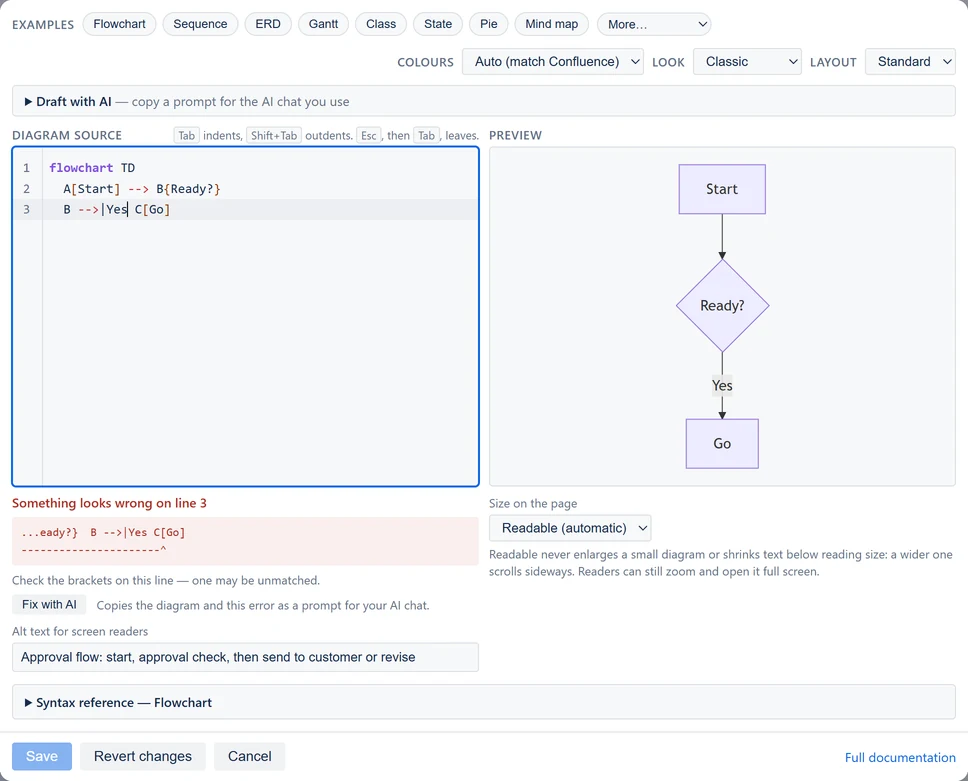
Save stays grayed out while the diagram has an error. It also checks the diagram at the moment you select it, so a mistake typed just before is caught too. Selecting it brings the error into view. The preview keeps the last version that worked.
Under the error, Fix with AI copies your diagram and the error as a prompt for the AI chat you use. See Draft with AI.
The hints
| Hint | What to check |
|---|---|
| "The first line needs to say what kind of diagram this is — for example "flowchart LR" or "sequenceDiagram"." | The first line names a kind of diagram, spelled exactly. |
| "The diagram looks unfinished — the last line may be incomplete." | The last line has its arrow, box and closing bracket. |
| "A line looks incomplete. Check for a missing label, arrow or bracket." | The line the message names, and the one before it. |
| "Check for an unexpected space, or a value missing after a colon." | Spaces inside a box's name, and the text after each colon. |
| "Check the brackets on this line — one may be unmatched." | Every [, {, ( and | has its partner. |
Four mistakes cause most errors:
-
Missing diagram type — the first line must say
what kind of diagram this is, such as
flowchart LR -
Unmatched brackets — every
[,{or(needs its closing partner -
Reserved words as box names —
endin particular; useEndordoneinstead -
Special characters in labels — wrap the label in
quotes:
A["Cost (EUR)"]
Messages on the page
- No diagram yet, with "Select this macro and choose Edit to write your Mermaid diagram." The diagram was saved empty. Edit the page, select it, and select Edit (see Change a diagram later).
- An error, with only Copy in the toolbar. The text can't be drawn. Select Copy and send the text to someone who can edit the page.
- Could not load the macro configuration or Could not load the diagram renderer. Reload the page. If it keeps happening, contact support.

For a stubborn error, edit the diagram and use Fix with AI under the message. See Draft with AI.