PlantUML: fix a problem
Fix an error
When PlantUML can't read the text, a message appears under it. It usually starts "Something looks wrong on line" and a number, and shows that line. Under it is a hint.
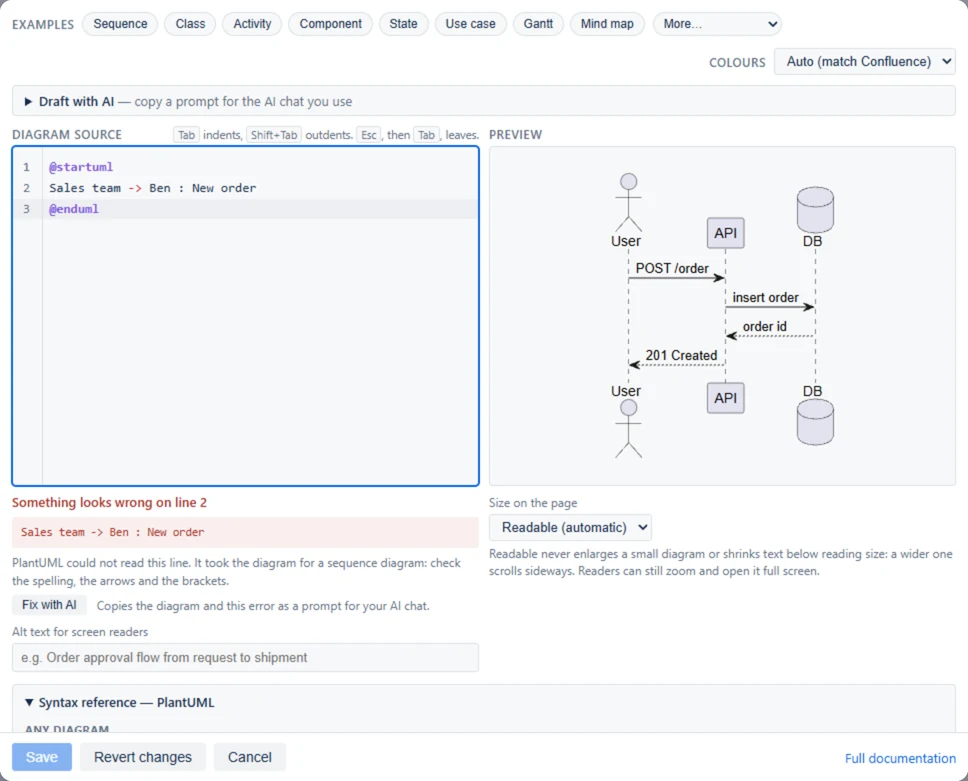
Save stays grayed out while the diagram has an error, so a broken diagram never reaches the page. The preview keeps the last version that worked. The mistake is usually on the line the message names, or the one just above it.
Under the error, Fix with AI copies your diagram and the error as a prompt for the AI chat you use. Paste the chat's answer back into Diagram source.
| Message | What to check |
|---|---|
| "PlantUML could not read this line: check the spelling, the arrows and the brackets." When the app can tell the kind of diagram, it also says which, such as "It took the diagram for a sequence diagram". | A name with a space needs double quotes and a short name: participant "Sales team" as Sales. An arrow is typed as ->, not →. Every bracket has its partner. |
| "… It took the diagram for a sequence diagram …", but yours is another kind | PlantUML couldn't tell what kind it is. Look for a missing } or a misspelled word near the top, and for the right start line, such as @startgantt for a Gantt chart. |
| "No diagram yet": "There is nothing to draw yet." | There is nothing between the start and end lines. Write the diagram, or pick an example. |
| "This kind of diagram is not drawn here" | Graphviz (@startdot), ditaa and formulas (@startmath, @startlatex) are not drawn by the app. A network diagram is drawn only with @startnwdiag. |
| "This diagram asks for … which this app does not include." | The diagram loads a library, such as !include <C4/C4_Context>. Leave the line out and draw the shapes with PlantUML's own words. |
| "A diagram is drawn from its own text alone." | The diagram loads a file or picture from a web address or a folder. Copy what it needs into the diagram itself. |
| "This diagram is too large to draw" | The largest side the app draws is 16,384 pixels. Split the diagram into two or more. |
The usual mistakes for each kind of diagram are in Learn PlantUML.
Troubleshooting
| What you see | What to do |
|---|---|
PlantUML Diagram is not in the / menu |
The app is not installed, or is at a version before PlantUML. Ask a Confluence admin. |
| Save is grayed out | The diagram has an error. Read the message under the text. See Fix an error. |
| "No diagram yet. Select this macro and choose Edit to write your PlantUML diagram." on the page | The diagram was saved empty. Edit the page, select the diagram and select Edit. |
| The picture has an extra box or person you didn't mean | A name is spelled two ways, or a colon is missing before an arrow's words. See mistakes that draw the wrong picture. |
| Part of the diagram is missing, and the editor says "Part of this diagram is not drawn" | The diagram asks for something the app does not include, and the rest is drawn without it. The message names what. |
| A Word export shows PlantUML text instead of the diagram | The diagram has no saved picture. Open it in the editor and select Save once. A very large diagram still has none: split it. |
| "This diagram is too large to draw" | The largest side of a drawing is 16,384 pixels, and the message gives the diagram's size. Split it into two diagrams; that usually reads better too. |
| The diagram is hard to read in dark mode | Set Colours to Auto. Check colors written into the diagram itself. |
| The diagram is tiny, or too wide | Readers can select Fit, zoom or open full screen. To change it for everyone, edit the diagram and use Size on the page. |
Questions and answers
Do I need to know how to code?
No. Start from an example and change the words. Learn PlantUML starts from nothing.
Does the app send my PlantUML diagrams anywhere?
No. PlantUML runs inside Confluence Cloud: each diagram is drawn in the reader's browser, and the app sends nothing outside Atlassian. It fetches no file, library or picture from the web either: the three libraries it draws ship inside it.
Is PlantUML a separate app or a separate license?
No. PlantUML Diagram is a second macro in the same app as Mermaid Diagram, with the same installation and the same license.
Can I paste diagrams from another PlantUML tool?
Yes, you can paste your PlantUML text into the editor. It is the same plain PlantUML. The app does not move diagrams from other PlantUML apps by itself: copy each one and paste it in. A diagram that includes a file from elsewhere, or a library other than C4, ArchiMate and Kubernetes, is not drawn.
Can I use Mermaid and PlantUML on the same page?
Yes. Each diagram is its own item on the page. Choose Mermaid Diagram or PlantUML Diagram when you insert it.
Can I turn a Mermaid diagram into a PlantUML one?
No. They are different languages. Insert a PlantUML Diagram and write the diagram again in PlantUML, or ask an AI chat to rewrite it.
Does it work on Confluence Data Center?
No. It works on Confluence Cloud only.
For Confluence admins
PlantUML comes with an update of the app. There is nothing to set up: once the site has the version that adds it, people who can edit a page can insert a PlantUML Diagram.
PlantUML is drawn in each reader's browser by a copy of PlantUML that ships inside the app. It fetches no file, library or picture from the web (see the question above). A PlantUML diagram is stored in the page like a Mermaid one, with its text, its settings, up to five earlier versions of its text and a picture for exports.
What the app can access, where diagrams are stored and how licensing works are the same for both kinds of diagram. See For Confluence admins in the main documentation.
Still stuck?
Email [email protected] with what you did and what you saw. Paste the diagram's text if you can: Copy in the toolbar on the page copies it. See Support for reply times.