How Mermaid text works
Every diagram starts as its source: the lines of text the app turns into a picture. The editor labels it Diagram source. The syntax is the rules for writing that text: which words, brackets and arrows mean what.
Four rules cover most diagrams:
-
The first line says what kind of diagram it is, such as
flowchart TD,sequenceDiagram,ganttormindmap. - Each thing gets a line of its own: a box and its arrow, a message, or a task.
-
Give a box a short name and put its words in brackets:
A[Write draft]. Use the name again to connect it:A --> B. The brackets set the shape:[ ]is a box,{ }a diamond for a question, and( )a rounded box. - Spaces at the start of a line are only for tidiness. In a mind map, though, they set the level.
Two tips. A line that starts with %% is a note to
yourself, and it is not drawn. Put words that contain brackets or
other symbols in double quotes: A["Cost (EUR)"].
Boxes and arrows
A flowchart shows steps as boxes joined by arrows.
LR on the first line draws it from left to right.
flowchart LR
  A[Write draft] --> B[Review]
  B --> C[Publish]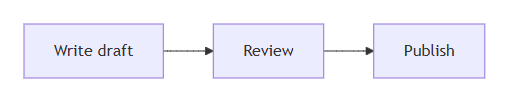
B appears twice in the text but is drawn once. Using its name again is what joins the two arrows.
A question gets curly brackets, and the words on an arrow go between
two bars. TD draws the diagram from top to bottom.
flowchart TD
  A[Leave request] --> B{Manager approves?}
  B -->|Yes| C[Book in HR system]
  B -->|No| D[Tell the employee]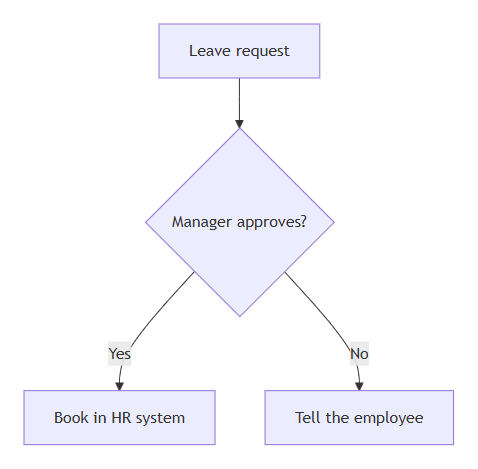
|Yes| and |No| label its two arrows.Messages between people
A sequence diagram shows who sends what to whom, in order.
->> sends a message, and -->>
is a reply, drawn dashed.
sequenceDiagram
  participant Customer
  participant Support
  participant Engineering
  Customer->>Support: Reports a bug
  Support->>Engineering: Passes it on
  Engineering-->>Support: Fix is ready
  Support-->>Customer: Your bug is fixed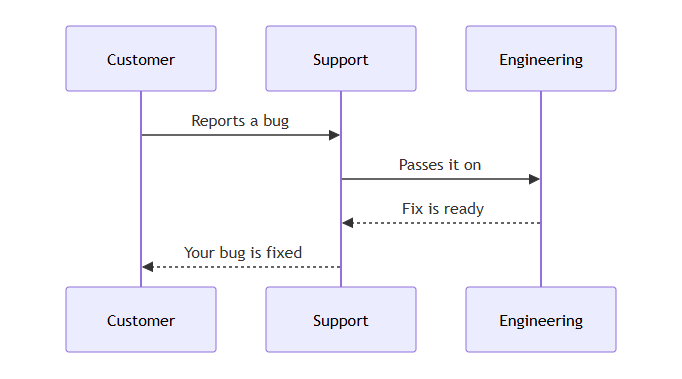
Tasks on a calendar
A Gantt chart is a project plan drawn as bars on a calendar. Each
task is a name, a colon, a short id, a start and a length. The start
is a date, or after and another task's id.
5d means five days. A milestone with a
length of 0d is drawn as a diamond.
gantt
  title Website launch
  dateFormat YYYY-MM-DD
  section Plan
    Write content :write, 2026-10-05, 5d
    Design pages  :design, after write, 7d
  section Launch
    Test          :test, after design, 3d
    Go live       :milestone, after test, 0d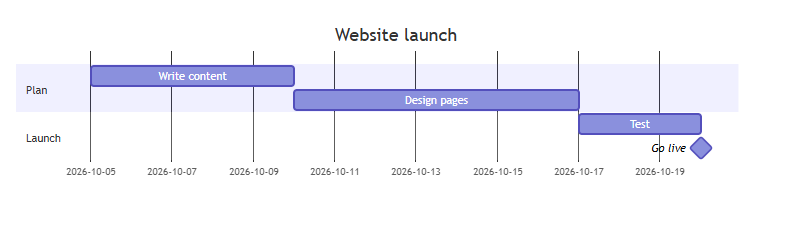
after starts when the task it names ends.An outline
A mind map puts one topic in the middle and ideas around it. The indentation sets the level: indent each level two spaces more than the one above.
Press Tab to indent a line two spaces, and Shift+Tab to take them away. The space bar works too. Enter starts a new line at the same level as the one above. To leave the text with the keyboard, press Esc, then Tab.
mindmap
  root((Team offsite))
    Agenda
      Goals for next year
      Look back at this year
    Travel
      Train tickets
      Hotel
    Budget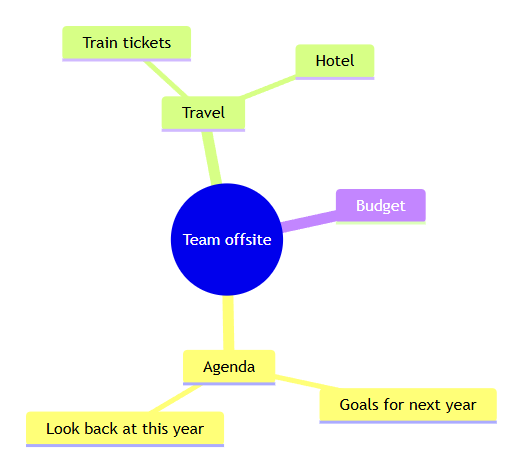
Stuck on a pattern? Open Syntax reference under the editor. It shows the patterns for the kind of diagram you are writing, whichever of the 32 kinds in Examples it is.
The editor's Full documentation link opens this guide. Mermaid's own reference, written for developers, is at mermaid.js.org.