Mermaid reference: the diagram on the page
Links
| Write | Meaning |
|---|---|
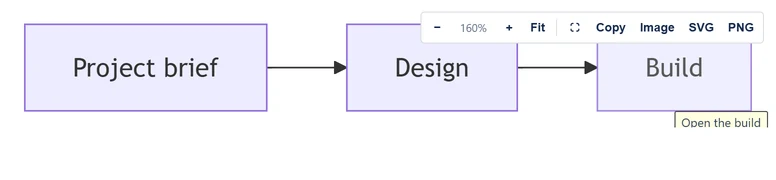
click A "https://…" | Node A opens the address |
click A "https://…" "Tooltip" | The same, with hover text |
- Links are supported in flowcharts.
-
Only
http:andhttps:addresses are kept. Any other scheme, such asjavascript:, is dropped. - Links open through Confluence, not inside the diagram's frame. A full address to a page or work item on your site opened in a new tab, with no prompt, when tested on 2.5.0.
-
A relative address is resolved against the frame's own address, on
Atlassian's app host. So the panel's example
click A "/wiki/spaces/DOCS"does not open your page. Confluence warns about an external page instead, so use full addresses. - Hover text shows, but on a short diagram it can be cut off at the frame's bottom edge.
-
A linked node gets
role="link"andtabindex="0", with the name "Open linked page". It opens with Enter or Space.
Colours
| Colours setting | Saved as | Drawn with |
|---|---|---|
| Auto (match Confluence) | auto | Mermaid's default theme on a light page, dark on a dark page. Under the Neo look: redux-color on a light page, redux-dark-color on a dark page |
| Default | default | default |
| Neutral | neutral | neutral |
| Forest | forest | forest |
| Dark | dark | dark |
A new diagram starts on Auto. Auto uses Confluence's light or dark mode, which Confluence passes to the app's frame. The computer's setting stands in only until Confluence answers, at most 1.5 seconds, or if that fails.
A theme set in the source wins over the Colours setting. It can be set in frontmatter, or in an init directive.
---
config:
  theme: forest
---
flowchart LR
  A[Draft] --> B[Published]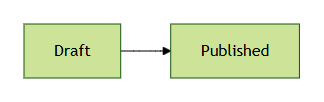
forest, whatever the Colours setting says.Panels
A diagram drawn darker or lighter than the page sits on a panel of
the background it needs. The app reads this from the colors Mermaid
drew the text and lines in, not from the theme's name. So Mermaid's
other dark themes, and a base theme given dark colors,
get a dark panel on a light page too. A light drawing on a dark page
gets a light panel.
When the source sets no theme or colors of its own, Auto matches the page and needs no panel. In print, every dark diagram sits on its panel, since paper is light.
Styling nodes
style, classDef and class
color nodes, and linkStyle colors lines. These
colors stay the same in every theme and mode.
Downloads and exports
- Image, PNG and SVG use the theme on screen. An Auto diagram on a dark page downloads dark.
- A PNG has a white background, or a dark gray one when the diagram is drawn dark, by the Colours setting or by a theme in its source. An SVG has no background.
-
The picture saved for exports draws Auto as
default, or asredux-colorunder the Neo look. A fixed setting is kept. It goes on the background its colors need, as a PNG does.
Look and layout
Two settings beside Colours, new in version 2.9. The page, the preview, downloads and the picture saved for exports all draw with them.
| Setting | Choice | Saved as | Draws |
|---|---|---|---|
| Look | Classic | Nothing: it is the default | As every version before 2.9 drew |
| Look | Hand-drawn | look: handDrawn | Every shape as a sketch, at Classic's sizes, and the same way each time |
| Look | Neo | look: neo | Mermaid 12's own look, with its sizes |
| Layout | Standard | Nothing: it is the default | Mermaid's Dagre layout, as before 2.9 |
| Layout | ELK | layout: elk | The ELK layout engine, for flowcharts and class, state, ER and requirement diagrams |
- A diagram saved before 2.9 has neither key, so it is Classic and Standard and draws as before. A diagram left at both defaults stores neither key.
- A kind of diagram that has only one look keeps it: a sequence diagram is never hand-drawn.
- Layout arranges the five kinds in the table. Every other kind keeps its own layout: mind maps, swimlanes and architecture diagrams have engines of their own, and use case and agent flow diagrams are always drawn with ELK.
- Under Neo, Colours on Auto is Neo's own palette (see Colours). Default, Neutral, Forest and Dark stay as they are under every look.
-
A look or layout set in the source's front matter wins over the
setting, as a theme there does. A source that asks for ELK
itself, with
layout: elk, gets ELK; before 2.9 it was drawn with Dagre. -
ELK is part of Mermaid 12. Its code, about 1.5 MB, is fetched
from the app's own files only when a diagram uses it. It runs in
the page, with no worker and no
eval. - A hand-drawn picture for exports is heavier than a classic one. In our tests fewer diagrams kept the sharpest picture, and with ELK as well one got none. ELK also lays some diagrams out taller, which can take one past the height Word holds. When a diagram gets no picture, Save asks first (see Saving without a picture).
- While the license is not active, both settings are off, like Colours.
Guide: Look and layout.
The diagram on the page
| Button | Accessible name | Does |
|---|---|---|
| − | Zoom out | Zooms out one step of 25% |
| + | Zoom in | Zooms in one step of 25% |
| Fit | Fit the whole diagram in view | Shows the whole diagram: a wide one shrinks to the width, a small one stays at its own size. With Size on the page set to Fill the width, fills the width. In full screen, goes back to the screen's size. |
| ⛶ | Full screen | Full screen on or off. A double-click on the diagram, not on a link, does the same. If the browser refuses, the diagram expands in place. |
| Copy | Copy diagram source text | Copies the source |
| Image | Copy image to clipboard | Copies a PNG |
| SVG | Download as SVG | Downloads diagram.svg |
| PNG | Download as PNG | Downloads diagram.png |
- The toolbar shows on hover or keyboard focus. On touch screens it always shows. The zoom level sits between − and +.
- Zoom runs from 25% to 400%. Ctrl or Cmd with the wheel zooms too.
- The diagram starts at its Size on the page. It is sized again when the width changes, until the reader zooms or selects Fit. A diagram wider than the page fades at the edge it continues past.
- Full screen opens as large as the screen allows, with all of the diagram in view, but never below what fits its width at its own size: a long diagram scrolls down instead of shrinking. Leaving full screen goes back to the page's size.
- PNG and Image are drawn at twice the diagram's natural size. Downloads are drawn again without HTML labels, so text can wrap a little differently.
-
The diagram has
role="img", named by its alt text, or "Mermaid diagram" without one. Print hides the toolbar. - Browsers: current Chrome, Edge and Firefox, and Safari 17.4 or later, which is what Mermaid 12 supports. A use case diagram uses a browser feature that arrived in Chrome and Edge 117, Firefox 119 and Safari 17.4; without it, the diagram shows "Could not render this diagram".
Messages
| Message | When |
|---|---|
| "Loading diagram…" | Before the diagram is drawn |
| "Image copied — paste it anywhere." | After Image |
| "Diagram source copied." | After Copy |
| "PNG downloaded." / "SVG downloaded." | After PNG or SVG |
| "This browser cannot copy images." | The browser has no image clipboard |
| "Clipboard blocked by the browser." | Copy was refused |
| "No diagram yet", "Select this macro and choose Edit to write your Mermaid diagram." | The saved source is empty. No toolbar. |
| "Something looks wrong on line N", or "This diagram could not be read", or "Could not render this diagram" | The source cannot be drawn. Only Copy shows. |
| "Could not load the macro configuration" | Confluence did not hand over the diagram. No toolbar. |
| "Could not load the diagram renderer" | Mermaid failed to load |
While the site's license is not active the page shows each diagram as it was last saved, with the toolbar; only the editor stops (see The editor). Before 2.8, the page showed "A licence is needed to show this diagram" in place of each diagram.
Exports
| Where | Each diagram becomes |
|---|---|
| The saved picture. Without one, the live diagram without its toolbar, which is slower, and a page with many of them can fail. | |
| Word | The saved picture. Without one, the alt text as a paragraph, then the source as a code block labeled mermaid. |
| Page history | The saved picture, or the alt text and code block |
REST export_view | Always the alt text and code block, even with a saved picture: Confluence asks for it as an email export (measured 5 October 2026) |
REST view | The saved picture, or the alt text and code block |
| Notification email | Always the alt text and code block |
| Include Page | The live diagram |
| Any other export | The alt text and code block |
| Any export, license not active | The same as with an active license (before 2.8: "A licence is needed to show this diagram.") |
The alt text paragraph appears only when the diagram has alt text. The picture's own alt text is the diagram's alt text, or "Mermaid diagram". An empty diagram exports as "Mermaid diagram (empty)", except in PDF.
The saved picture
- It is drawn when you select Save, in the diagram's Look and Layout. Auto is drawn as
default, or asredux-colorunder the Neo look, on the background its colors need (see Colours). - It is shown at its natural size, up to 680 px wide, centered.
- It is drawn at 2 pixels per CSS pixel. It steps down to 1.5, 1 and 0.75 until it fits about 73 kB. It is an indexed-color PNG of up to 256 colors, with the diagram's main colors kept exact. That makes it about 40% smaller than before 2.6, so most large diagrams keep 2 or 1.5. A browser that cannot make one saves an ordinary PNG.
- It is skipped when the source is over 50,000 characters, or the preview took over 1.5 seconds. It is also skipped when it would be taller than 2,112 CSS px where it is shown (22 inches, the tallest picture Word holds), takes over 5 seconds, or does not fit. Then Save asks first; see Saving without a picture.
- A save that changes neither the source nor Colours, Look or Layout reuses it, when the Mermaid now in the app drew it. A picture an earlier Mermaid drew, which is every picture saved before 2.9, is drawn again at the next save, and so is one saved before 2.6 in full color. The old picture is kept if the new drawing fails.
- Exports use a picture only while it still matches the source and those three settings, whichever version drew it. So a picture saved by 2.4 to 2.8 keeps exporting as it was drawn, even where Mermaid 12 now draws the diagram a little differently on the page: open the diagram and select Save to bring the two in line. For a source that sets its own theme or colors, a picture saved before 2.6 no longer matches: it exports as code until the diagram is saved again, and page versions from before that save keep the code.
- If Confluence refuses the save with the picture, the editor asks first, as for a diagram with no picture.
- Diagrams saved before version 2.4 have none until they are opened and saved.
The export function
Confluence calls the app's own function on Atlassian's platform for every diagram in an export. It receives the diagram's saved settings and returns a picture or text.
It keeps nothing, makes no network calls and logs only an error's name. Each diagram is one call per export.
CONFCLOUD-82734 reports that pages with about 100 or more such macros can reach Atlassian's call limit. Some diagrams are then missing from the export.